Construction companies and main contractors
Many jobs at once, own crews and subcontractors, progress statements, advances and retentions.
BILVAO Stavba · software for construction companies
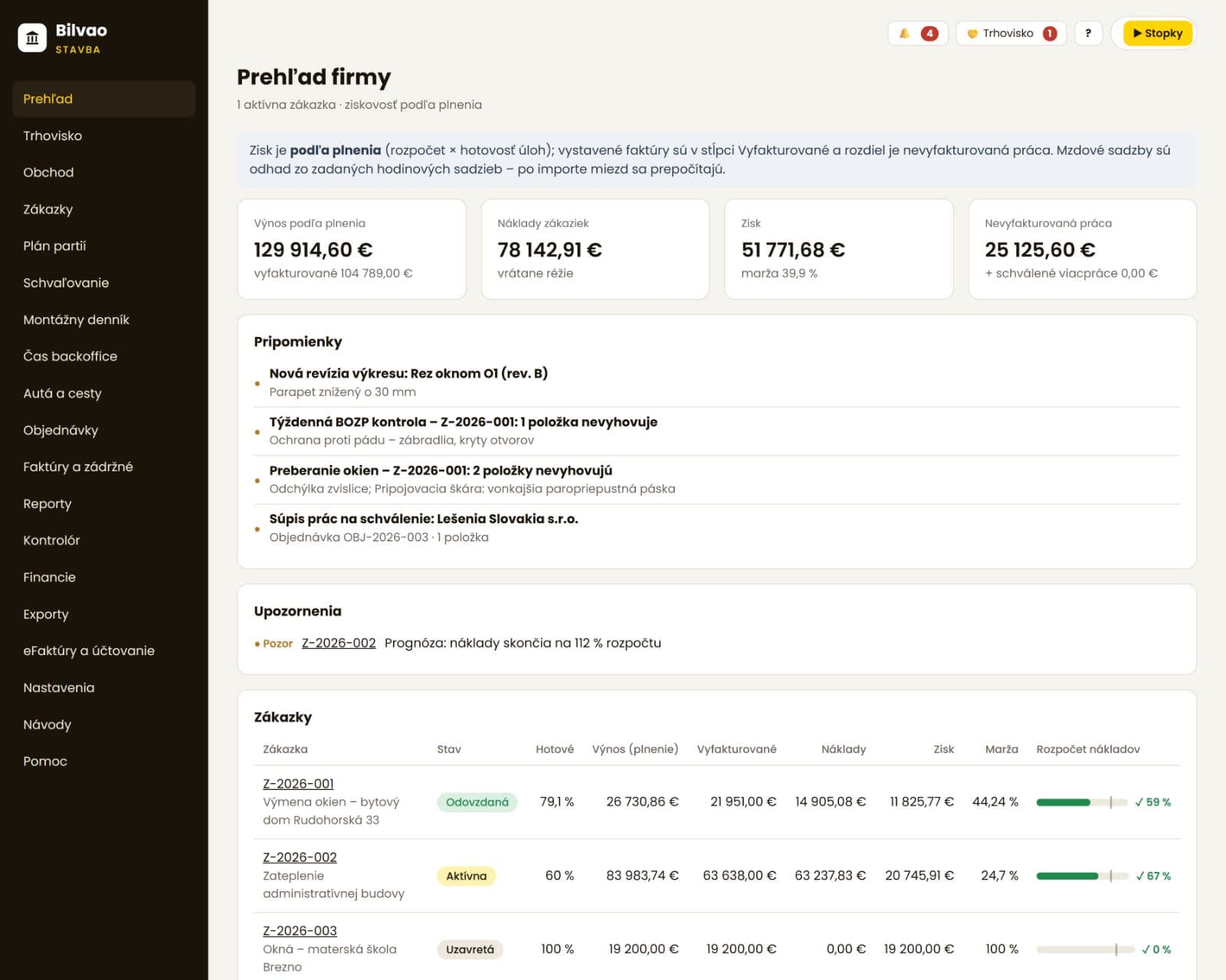
Jobs, crews, site diary, purchasing and invoicing in one place – and for every job you can see whether it makes money. As you go, not months later at year-end. Built by an accounting firm that understands construction.
1 app
instead of Excel, a paper diary and WhatsApp groups
Offline on mobile
check-ins, photos, tasks and defects without signal
Live profit
for every job, not only at year-end
Free trial
sign up in minutes, no credit card
Sound familiar?
Most construction companies only find out months after handover – when all the invoices, wages and materials finally meet in the books. By then it is too late to change anything.
Who BILVAO Stavba is for
Designed for small and mid-sized construction companies in Slovakia: from a five-person crew to a company with its own site managers and dozens of subcontractors.
Many jobs at once, own crews and subcontractors, progress statements, advances and retentions.
Windows and doors, insulation, roofing, drywall, electrical, heating and ventilation – handover protocols and checklists ready to use.
Attendance, diary and invoices without extra admin. Manageable even for an owner who spends the day on site.
A dedicated portal for progress statements and invoices against orders – plus a profile on the BILVAO marketplace where companies can find you.
Access to their own job only: signed diary, approval of extra work, handover and defects – without your internal prices.
If we keep your books, documents from Stavba go straight to your accountant – less paper and no chasing.
Features
No extra programs, spreadsheets or group chats. See what it looks like inside – the screenshots come straight from the app (Slovak interface).
Showcase 01 · Mobile on site
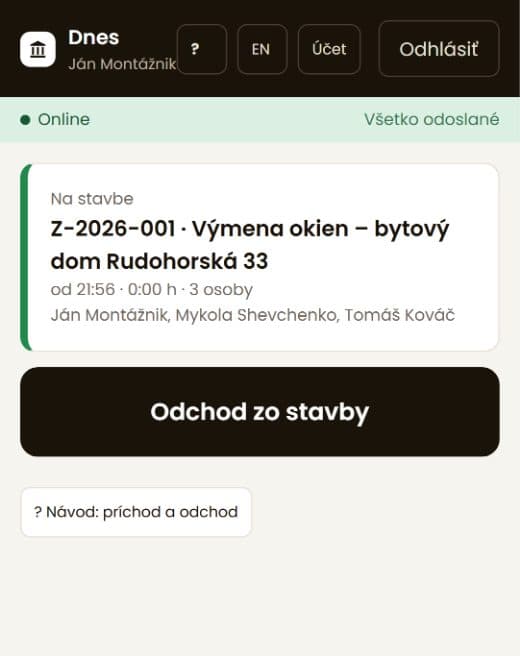
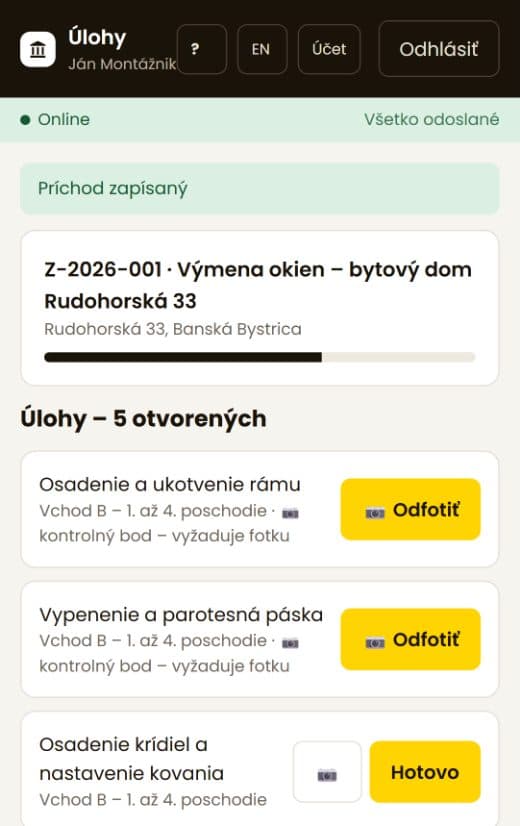
The mobile app is built for gloves, sunlight and weak signal. It works offline – everything is sent once the phone reconnects.
Check-in and check-out with the crew
One tap for the whole crew, with location recorded only at that moment. A forgotten check-out is caught automatically.
Photos, tasks and defects
Photos are attached to a task, a location in the building or a defect on the drawing. The office sees them right away.
Checklists and finger signatures
Window handover, ETICS, health & safety or scaffolding – a failed item becomes a defect with a deadline.
Slovak and English · Android and iPhone
Showcase 02 · Profitability and forecast
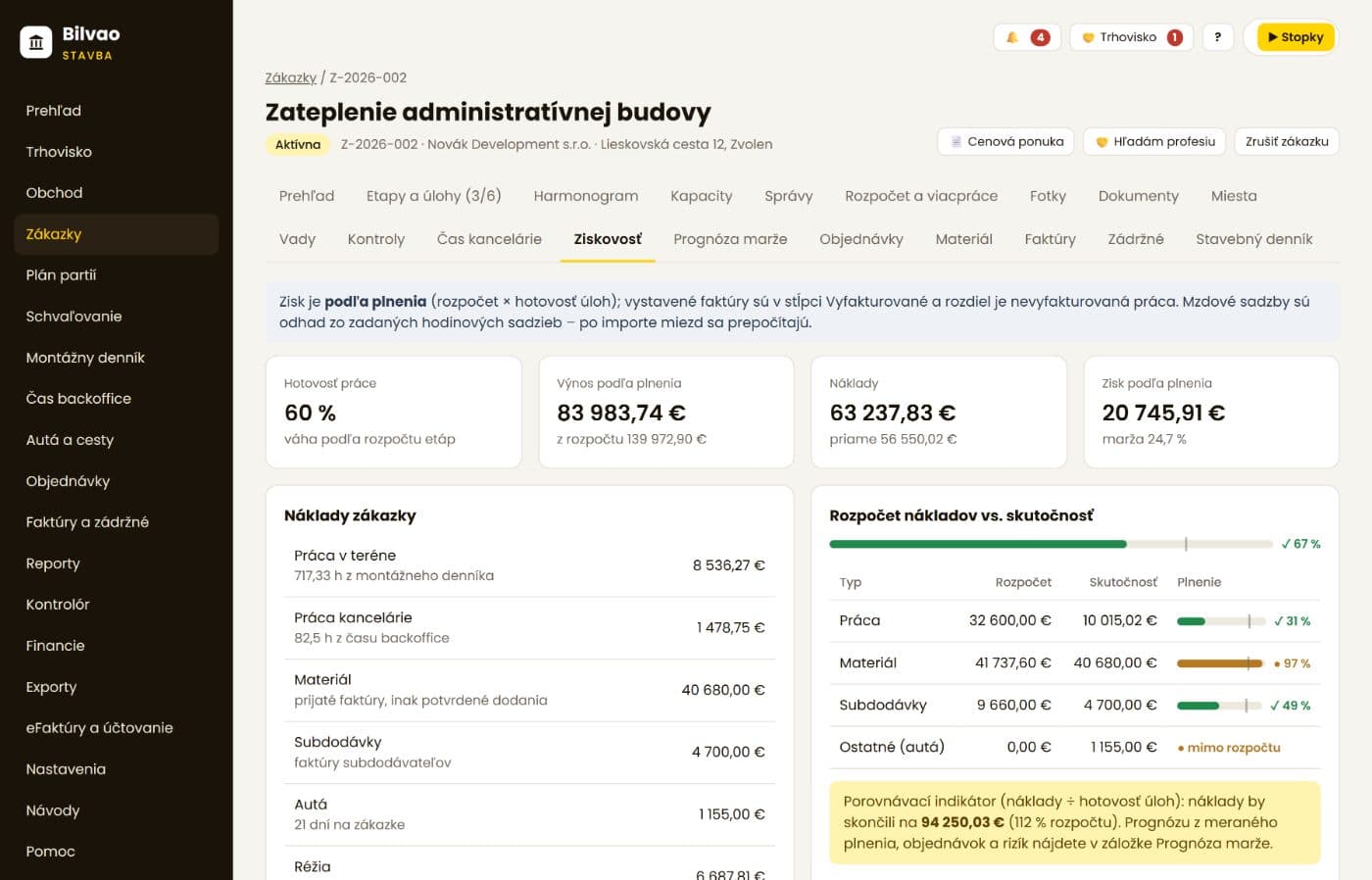
Labour priced at cost rates, materials from delivery notes, subcontracts, vehicles and overheads add up automatically. The final margin forecast shows where each job is heading.
Cost budget versus actuals
By cost type, with alerts at 80 and 100 % of budget.
Final margin forecast
From confirmed progress, open orders and remaining work – with a list of missing data; nothing is silently counted as zero.
Controller
Flags looming losses, unbilled work, unapproved extra work or an upcoming cash shortfall on its own.
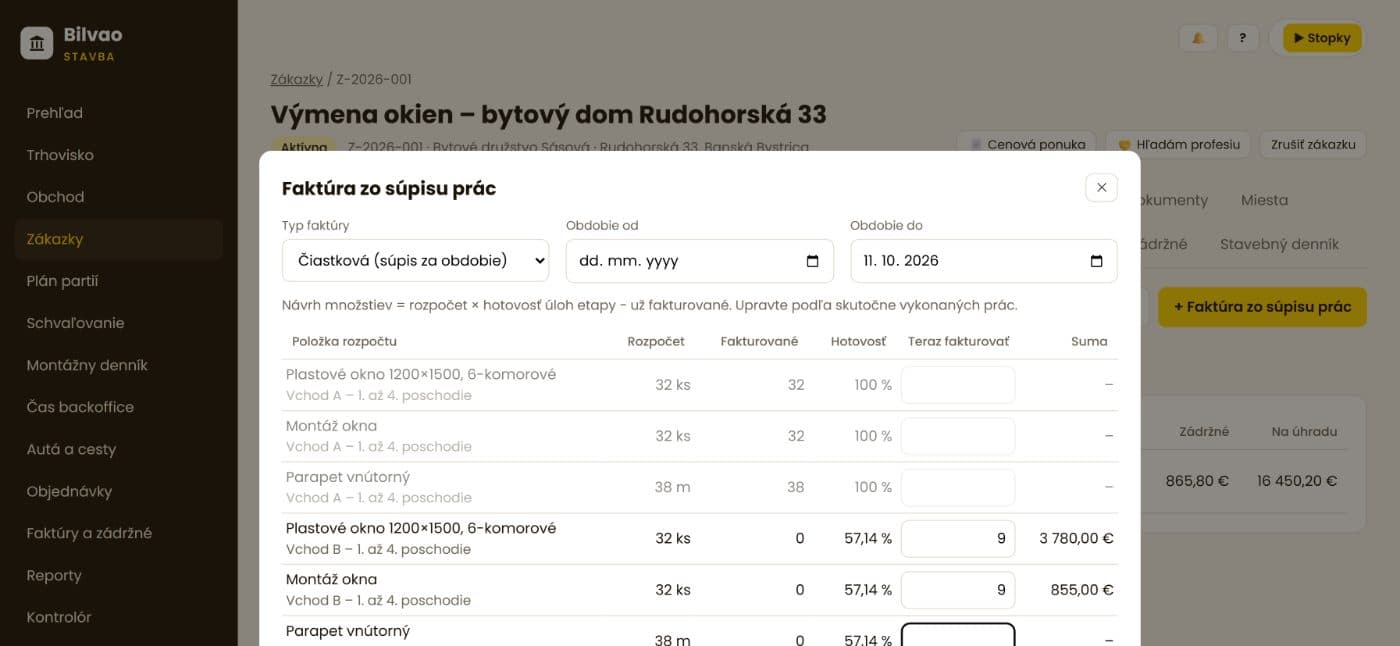
Showcase 03 · Invoicing
Interim and final invoices are created from the statement of completed work – including extra work, advance deductions, retention and the correct VAT regime.
Advances with tax documents
When an advance is paid, the app issues the tax document for the received payment and deducts it on the final invoice.
Retention under control
Deducted on every invoice, tracked through the handover protocol, the retention period and the release request.
Reverse-charge VAT for construction work
Applied according to the type of supply and the customer, with the reasoning stored on the document. Bank statement payments are matched automatically.
e-invoice · Peppol via BILVAO invoicing · PDF by e-mail
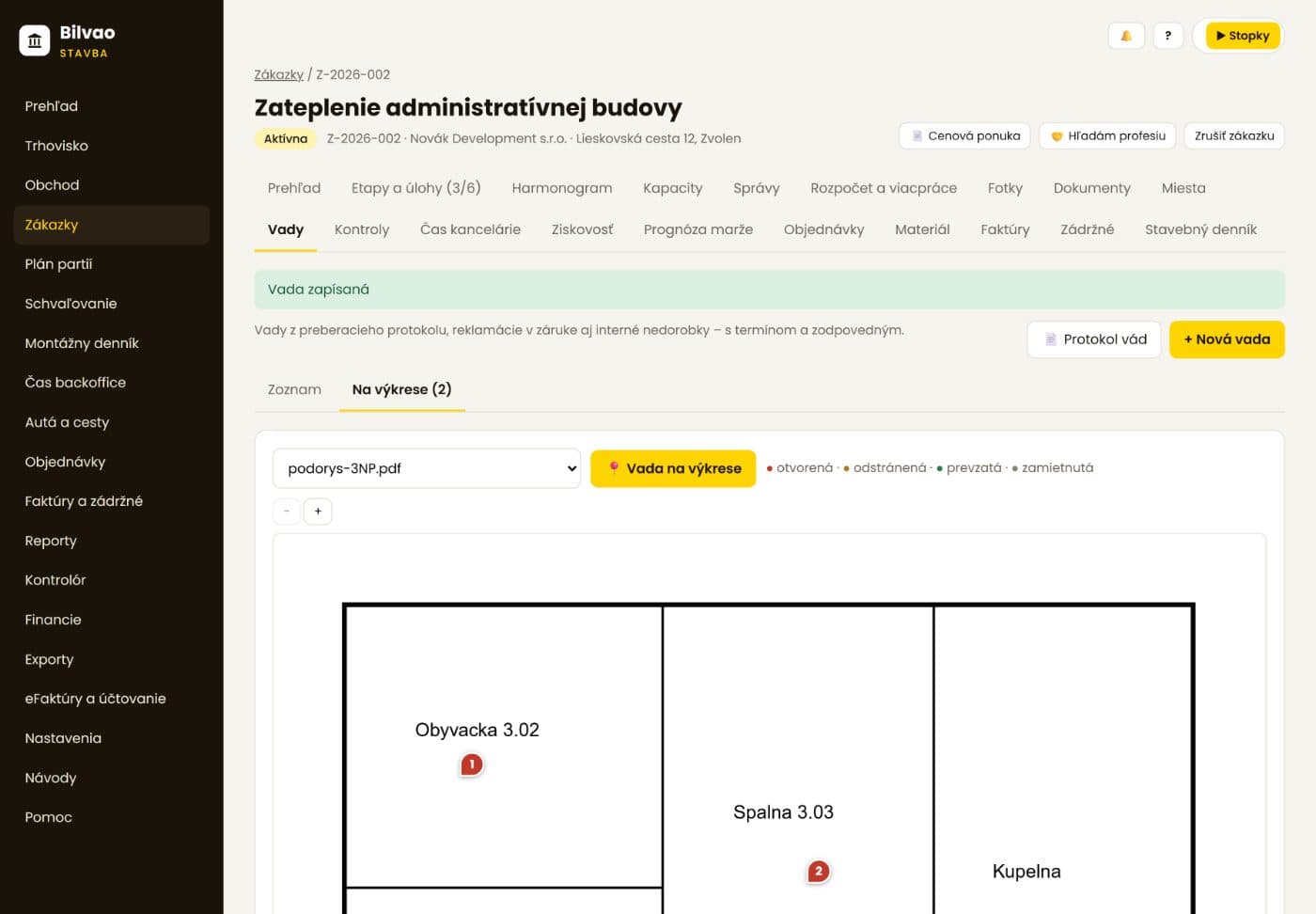
Showcase 04 · Site diary, drawings and defects
An electronic site diary with weather and signatures, drawings with revisions right on the phone, and defects pinned to a spot on the drawing or an element of the 3D model.
Site diary
Daily entries with crews, weather and photos; the client can read signed entries.
Drawings and BIM
Drawing revisions with history, mark-ups, IFC models in 3D – on mobile, even offline.
Defect report in PDF
Summary, drawing extracts with pins and photos for every defect – by owner, status or location.
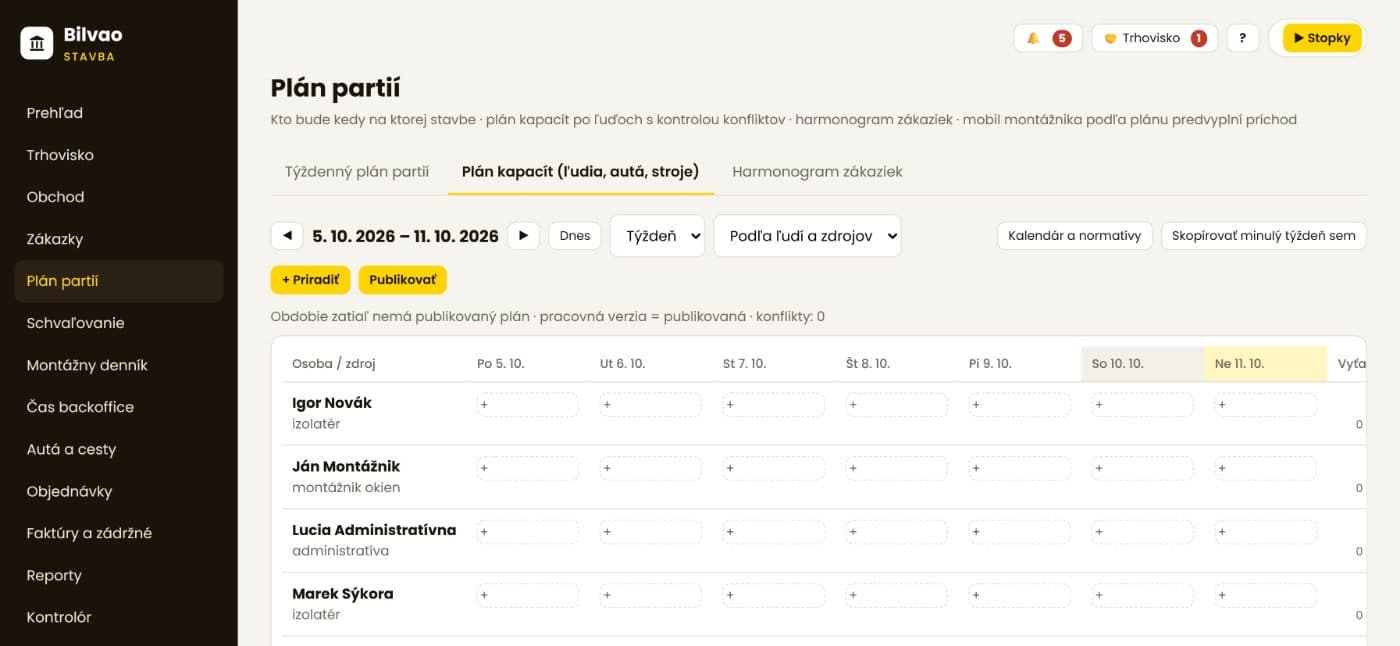
Showcase 05 · Crew and capacity planning
Plan people, vehicles and machines on jobs day by day. The app checks for conflicts, and workers see the plan on their phones once it is published.
Conflicts checked by the system
A person or vehicle in two places at once, holidays, expired qualifications or missing travel time.
Job schedule
Phases with dependencies, milestones and delays on one chart.
Capacity demand
How many people and days you need based on budget norms – and the earliest possible start.
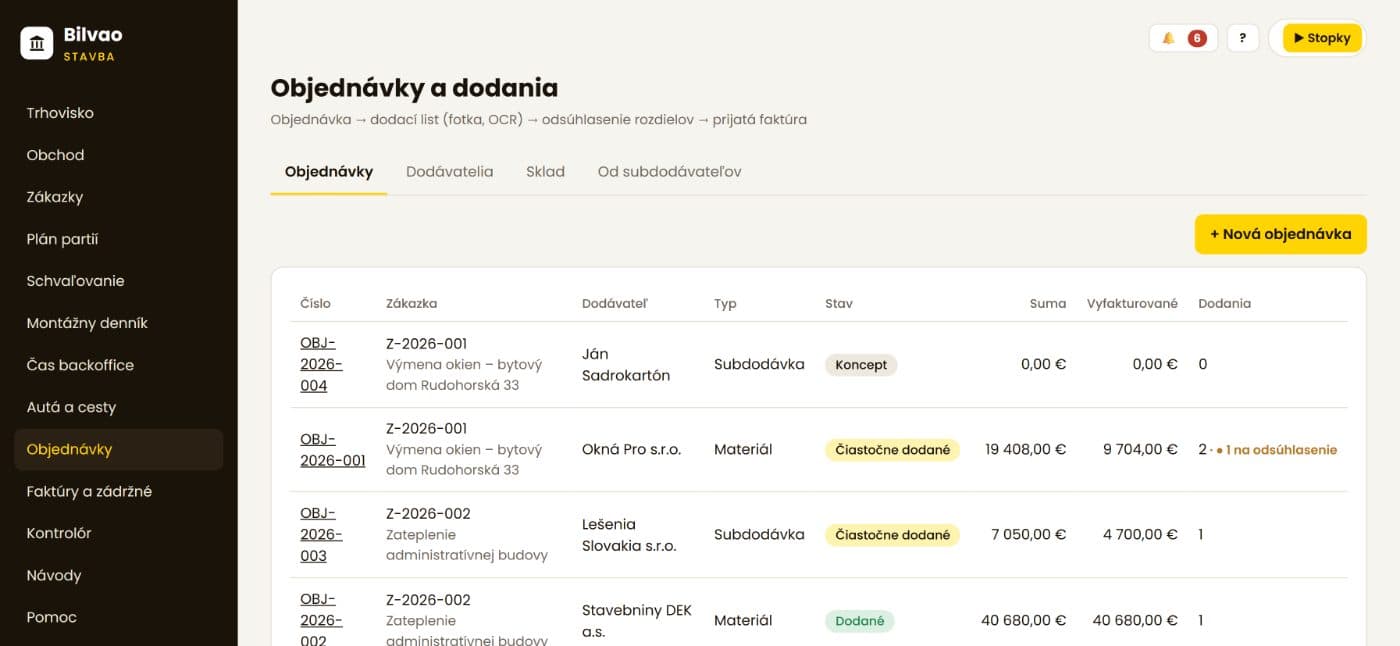
Showcase 06 · Purchasing and accounting
Purchase order, delivery note and supplier invoice are matched to the job's items. An invoice can never cover more than was delivered – so job costs are right.
Purchase approvals
Limits by amount, nobody approves their own purchase, deputies during holidays.
Incoming e-invoices
UBL invoices are validated and matched to the supplier, purchase order and job.
Export to POHODA and payroll
Documents with posting codes in batches; hours, overtime and holidays for payroll. Month-end closing locks what is done.
Complete overview
Jobs and phases
Job status, phases, tasks, procedures and clients
Budget and price list
Import from KROS / Cenkros, price list with norms, costing
Quotes
PDF quotes and a sales pipeline for enquiries
Extra and reduced work
Request, client approval, contract price history
Site attendance
Crew check-in and check-out, breaks, weekly approval
Office time
Timer and timesheets for back-office work on jobs and overheads
Site diary
Daily entries, weather, signatures, client read access
Photos and documents
Photos by task and location, documents with visibility settings
Drawings and BIM
Revisions, mark-ups, IFC models, defects on elements
Defects and claims
Deadlines, owners, building structure, PDF report
Checklists
Handovers, health & safety, scaffolding, custom forms, signatures
Safety, tools and inspections
Safety briefing at check-in, inspections with expiry alerts
Crew and capacity plan
People, vehicles and machines, conflicts, publishing to mobile
Schedule
Gantt chart, dependencies, milestones and delays
Orders and deliveries
Delivery notes, discrepancies, stock and material transfers
Subcontractors
Portal, statements for approval, insurance and ratings
Approvals
Purchase orders and supplier invoices by limits and roles
Invoicing
Progress statements, advances, retention, credit notes, VAT, e-invoices
Payments and receivables
Bank statements, partial payments, reminders, ageing
Profitability and forecast
By job and cost type, final margin forecast
Cash flow and reports
Cash outlook, job comparison, receivables ageing
Controller
Automatic risk findings with evidence and an owner
Finance and closing
Dated cost rates, exceptions, month-end closing
Vehicles and travel
Logbook, fuel, travel allowances
Accounting
Export to POHODA, payroll data, incoming e-invoices
Roles and permissions
Owner, office, site manager, accountant, worker, client
BILVAO marketplace
Directory of professionals, subcontract requests, investment projects
Help and guides
Role-based guides, downloadable manuals, support requests
For your whole team
Permissions follow roles. Workers don't see prices, clients don't see your costs, and site managers see their own jobs.
Owner
Site manager
Site worker
Office
Accountant
Client and subcontractor
Why BILVAO
We are an accounting firm. Every month we see where construction companies lose money – unpriced hours, unbilled extra work, forgotten retentions, VAT mistakes. BILVAO Stavba was built to stop that.
Not another program next to your accounting. Documents from site go straight to accounting and POHODA – in the right VAT regime and assigned to the job.
Less paper, no chasing documents.
Reverse-charge VAT for construction work, tax documents for advances, retentions, e-invoicing and Peppol, meal and travel allowances – built on Slovak rules.
Designed with accountants, not from a foreign template.
Help right inside the app, guides for every role and downloadable manuals. We help you set up the company, people and cost rates.
Answered by people who understand both construction and numbers.
The mobile app works offline, in English for foreign workers, with big buttons. Installed on a phone in a minute.
If the crew won't use it, nothing works.
A missing cost rate, an incomplete check-out or an unmatched invoice is never counted as zero – it shows up as an exception to fix.
The margin is accurate – or you see why it isn't yet.
The app evolves based on feedback from construction companies. Send a request straight from the app and follow how it's handled.
New features without reinstalling – updates are automatic.
Comparison
| Area | Excel, paper, chats | BILVAO Stavba |
|---|---|---|
| Crew attendance | Scraps of paper, retyped on Friday | Check-in and check-out on mobile, linked to the job |
| Job profit | Only after the annual closing | Continuously, with a final margin forecast |
| Extra work | Verbal agreements | Request, client approval, on the invoice |
| Site diary and photos | Filled in afterwards, photos on phones | On site, with date, location and signature |
| Invoices with advances and retention | Manual calculation, risk of VAT errors | From the statement, with tax documents and the correct VAT regime |
| Documents for the accountant | Searching, scanning, questions | Assigned to jobs, exported to POHODA |
| Client updates | E-mails and phone calls | A client portal for their job |
Getting started
No lengthy implementation. Start with one job and see your own numbers within a few weeks.
Register your company in a few minutes. We verify your company ID in the business register and fill in the details.
Day 1 · free
The "Getting started" card guides you: people and cost rates, crews, the first job and budget. We are happy to help.
First week
Workers install the app on their phones, the site manager keeps the diary, the office invoices from the progress statement.
Weeks 2 – 4
Together we look at the margin, unpriced hours and unbilled work. Then you decide on the next jobs.
After one month
Security and data
Access over HTTPS only; passwords are stored in hashed form only.
The app and data are hosted in a data centre in Germany.
Backups every day and regular test restores, so the backup really works.
Each company sees only its own data; each user only what their role allows.
Questions and answers
You can try the app for free without entering a credit card. Pricing depends on the size of your company and how you use it – get in touch and we will send you an offer.
The mobile app for site workers is available in Slovak and English. The office part of the app (invoicing, finance, settings) is currently in Slovak, as it is built around Slovak tax and accounting rules. Our team will gladly help English-speaking managers get started.
No. BILVAO Stavba works for any construction company and exports documents to POHODA for your accountant. If we keep your books, the connection is even simpler – we have the source data right away.
Yes. The worker's mobile app shows only the essentials: check-in and check-out, tasks, photos and defects – with big buttons, in Slovak or English. Every screen has a short guide.
The mobile app works offline. Check-ins, photos, tasks, defects and checklists are stored on the phone and sent automatically once it reconnects. The worker can see what is still waiting to be sent.
No. In the office a web browser is enough. On a phone, you add the app to the home screen straight from the website (Android and iPhone) and it opens like a regular app. Versions for Google Play and the App Store are in preparation.
Yes. Upload the budget file (xlsx) including sections and items. From the price list with norms you can prepare costing and a quote.
Location is recorded only at the moment of check-in and check-out and when taking a photo – not throughout the day. It confirms that the work took place on the given site.
Yes. When an advance is paid, a tax document for the received payment is issued and the advance is deducted on the final invoice. Retention is deducted on every invoice and its release is tracked. Reverse-charge VAT is applied according to the type of supply and the customer, and the decision is stored on the document.
Yes, each with restricted access. A client sees only their own job – the signed diary, extra work for approval, handover and defects, not your internal prices. A subcontractor sees their orders and submits progress statements and invoices for approval.
Invoices from Stavba can be issued through BILVAO invoicing as e-invoices and sent via the Peppol network. Incoming supplier e-invoices can be uploaded and matched to the purchase order and job.
Data is stored on servers in the EU with daily backups. Your data belongs to you – documents can be exported and we will hand them over when you leave. Every user can also delete their own account.
We help with the initial set-up. Inside the app you'll find guides for every role, downloadable manuals and a Help button to send questions or feedback straight to us.
Try BILVAO Stavba for free, or book a 30-minute demo – we'll show it to you on a real job.